Scoring genre clarity...

GB BASIC capsule

GB BASIC

GameBuilder BASIC (GB BASIC) is a retro Fantasy Console that generates ROMs compatible with the popular handheld game console.

Free to PlayPositive(14)
Early AccessGame DevelopmentDesign & Illustration
Tony WangAug 19, 2025

GB BASIC scores 78/100 — better than 84% of Early Access capsules (n=3,067).

Positive (14 reviews) · Free to Play · Released Aug 19, 2025 · By Tony Wang

Quick text summary

GB BASIC scored 78/100 on Steam Analyzer — Good for a Early Access capsule. Top priority fix: [composition] Integrate the keyboard more tightly into the device silhouette or reposition it as a clear framing element rather than a floating accessory.

Capsule scores by dimension

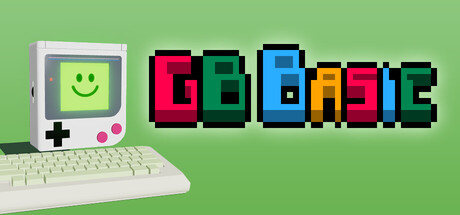
  • Genre Clarity: 8/10 — Strong retro gaming context clear. The pixel art Game Boy-style device on the left immediately signals retro handheld gaming, while the blocky colorful text spells out the product name in classic 8-bit aesthetic. At tiny size, the silhouette of the handheld console remains recognizable and the pixel art text is still parseable, clearly communicating a game development/retro gaming tool rather than a traditional gameplay experience.
  • Title Readability: 7/10 — Bold pixel text readable at small. The title 'GB BASIC' uses thick blocky pixel letters in distinct colors (red, green, blue, yellow, red, green) with black outlines that maintain legibility even at small and tiny sizes. The spacing is generous and the outline treatment prevents letterform collapse, though at tiny size the individual letter colors blend slightly and become harder to distinguish as separate blocks.
  • Contrast & Color: 8/10 — Vibrant palette pops on green. The bright lime green background creates strong value separation from the black-outlined pixel text and the grayscale Game Boy device on the left. The colorful blocky letters (reds, greens, blues, yellows) have high saturation and stand out clearly in quick scroll, with the white and cream keyboard adding additional light value contrast to the lower left anchor point.
  • Uniqueness & Polish: 8/10 — Distinctive retro aesthetic well executed. The capsule nails a specific visual identity: authentic Game Boy hardware paired with playful pixel art typography that communicates the core concept of a fantasy console builder. The craft is clean with consistent pixel rendering, intentional color choices, and a memorable hook that distinguishes it from generic education or tool software—this feels purpose-built and confident.
  • Brand Consistency: 8/10 — Cohesive retro gaming brand identity. The visual language is internally consistent with pixel art throughout, a unified warm-and-cool color palette, and clear thematic alignment around retro handheld gaming. The Game Boy device, pixel text, and green background all reinforce a singular brand identity that should be recognizable across marketing materials—no conflicting style directions or generic placeholder elements.
  • Composition: 8/10 — Clear hierarchy with balanced layout. The Game Boy device anchors the left side as a secondary focal point, while the colorful title text dominates the right and center, creating a natural reading flow left-to-right. At small and tiny sizes, both elements remain visible and the composition does not collapse; the bright background isolates the subjects effectively and there are no cramped edge elements that would be lost to Steam's crop margins.

What works

  • Strong visual theme clarity. The Game Boy device immediately communicates retro gaming and fantasy console concept without confusion.
  • Excellent small-size resilience. Both the pixel art device and blocky text remain legible and distinct even when scaled down to tiny thumbnail size.
  • High color vibrancy and pop. The saturated colorful palette and black outlines create memorable visual impact against the Steam dark background.
  • Polished pixel art execution. Clean rendering, consistent style, and intentional design choices feel premium rather than amateur or template-based.

What hurts the capsule

  • Limited visual depth and layering. The composition is relatively flat with minimal foreground-midground-background separation, reducing sense of spatial dimension.
  • Keyboard element feels secondary. The cream keyboard on the lower left is somewhat disconnected from the main composition and does not integrate tightly with the overall design.
  • Text color distinction muddies at tiny. While readable, the individual letter colors in the title become harder to parse as separate blocks when scaled to very small sizes.

Priority fixes

  1. [composition] Integrate the keyboard more tightly into the device silhouette or reposition it as a clear framing element rather than a floating accessory.
  2. [contrast_color] Consider adding subtle drop shadow or depth glow behind the title text to enhance separation from the bright green background at tiny sizes.
  3. [uniqueness_polish] Introduce a subtle secondary visual element (icon, sprite, or design accent) that hints at game development or ROM creation to strengthen the unique selling point.

Store copy priority fixes

  1. [hook_strength] Rewrite the short description to lead with outcome: 'Make real Game Boy games in BASIC—no experience needed. Code, design, and play your creations on actual hardware.' This replaces the passive 'generates ROMs' with active player agency and immediate tangible value.
  2. [uniqueness] Add a 1-2 sentence comparison or positioning statement after the first paragraph, such as: 'Unlike PICO-8, GB BASIC produces authentic Game Boy ROMs compatible with original hardware and emulators. Unlike GB Studio, you have full creative control through a real programming language.' This clarifies the niche and differentiator.
  3. [audience_targeting] Add an explicit skill-level and experience callout early in the detailed description: 'Ideal for beginners learning to code through game creation, and experienced developers wanting to target original Game Boy hardware.' This helps users self-identify and reduces decision friction.
  4. [genre_clarity] Reword or restructure the genre tags to remove 'RPG' and 'Simulation' (which describe the games you make, not the tool itself); replace with 'Game Development Tool' and 'Programming' to match the actual product category and avoid store browse confusion.

Related guides

Steam app ID: 2308700 · Tags: Early Access, Game Development, Design & Illustration, 1980s, 1990's