Scoring genre clarity...

Sea Aquarium Screensaver capsule

Sea Aquarium Screensaver

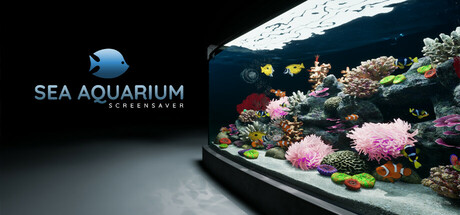
A Virtual Sea Aquarium for relaxation and meditation. Watch the gentle movement of fish and immerse yourself in a calming underwater world. No goals, no controls—just pure visual serenity.

$3.99
SimulationLife SimSide Scroller
Spinal GamesMar 13, 2025

Sea Aquarium Screensaver scores 72/100 — better than 41% of Simulation capsules (n=5,188).

$3.99 · Released Mar 13, 2025 · By Spinal Games

Quick text summary

Sea Aquarium Screensaver scored 72/100 on Steam Analyzer — Good for a Simulation capsule. Top priority fix: [title_readability] Remove or enlarge the 'SCREENSAVER' tagline to ensure it remains readable at small sizes, or rely on the main title alone for clarity.

Capsule scores by dimension

  • Genre Clarity: 8/10 — Aquarium simulation clearly legible. The capsule immediately communicates a relaxation/aquarium screensaver through the vibrant coral reef scene with fish, water lighting, and peaceful underwater setting. At tiny size, the colorful aquarium tank and fish silhouettes remain recognizable, though fine detail is lost. The blue fish logo reinforces the aquatic theme and aids genre recognition even at minimal sizes.
  • Title Readability: 7/10 — Title readable but tagline lost. The main 'SEA AQUARIUM' text in white reads clearly at full and small sizes with good contrast against the dark background. However, the small 'SCREENSAVER' tagline below becomes unreadable at tiny size and disappears into noise during quick scroll. The title placement on the left with the logo anchors it well, but the secondary text creates a legibility penalty.
  • Contrast & Color: 8/10 — Strong value separation, vibrant reef. The bright coral, fish, and water lighting pop distinctly against the dark background gradient, with yellow fish and pink corals providing strong saturation contrast. The lighting from above creates clear silhouettes and depth. Even at tiny size, the warm-colored reef elements separate well from the cool dark water and black margins, maintaining readable separation in grayscale.
  • Uniqueness & Polish: 7/10 — Professional aquarium render, adequate. The 3D aquarium rendering is clean and well-lit with realistic fish behavior and coral detail, conveying a premium meditation app feel. However, the presentation is somewhat generic for the aquarium/screensaver category—it shows a beautiful scene but lacks a distinctive visual hook or memorable unique mechanic. The render quality is solid but doesn't stand out as distinctly as genre leaders like DAVE THE DIVER.
  • Brand Consistency: 6/10 — Minimal branding, no iconic identity. The blue fish logo is simple and consistent with the theme but not particularly memorable or distinctive; it could belong to many aquarium products. The color palette (blues, corals, warm lighting) is thematic but generic to the genre. There are no signature visual motifs, character designs, or distinctive stylistic cues that would make this instantly recognizable as a unique product on second encounter.
  • Composition: 7/10 — Clear focal hierarchy, good balance. The aquarium tank is positioned as the dominant central focal point with the logo and title cleanly anchored to the left, creating clear visual hierarchy and leaving breathing room. The composition reads well at small and tiny sizes with a coherent foreground (aquarium), midground (fish and coral), and background (dark water gradient). Safe margins appear respected, though the right edge of the tank approaches the boundary—minor crop risk at certain Steam display sizes.

What works

  • Strong underwater atmosphere. The vibrant coral reef with colorful fish and natural lighting immediately communicates relaxation and serenity, perfectly matching the screensaver positioning.
  • Excellent contrast against dark background. The bright warm-toned reef elements pop sharply against the cool dark water and black margins, ensuring visibility even at tiny thumbnail size.
  • Clean left-aligned layout. Logo and title are well-positioned on the left with ample negative space, creating professional balance and readability across all sizes.

What hurts the capsule

  • Tagline becomes unreadable at small size. The 'SCREENSAVER' text below the main title disappears in tiny view and adds visual clutter without benefit during quick Steam scroll.
  • Generic product identity. The blue fish logo and overall presentation lack distinctive branding cues or memorable visual identity that would differentiate this from other aquarium products.
  • Lacks unique visual storytelling. The capsule shows a beautiful scene but communicates only 'nice aquarium'—it doesn't hint at distinctive features, mechanics, or the specific meditative/screensaver positioning that sets it apart.

Priority fixes

  1. [title_readability] Remove or enlarge the 'SCREENSAVER' tagline to ensure it remains readable at small sizes, or rely on the main title alone for clarity.
  2. [uniqueness_polish] Add a distinctive visual element or signature detail (unique fish species, exclusive coral style, or signature lighting effect) that hints at what makes this screensaver special compared to generic aquarium products.
  3. [brand_consistency] Develop a more iconic logo or visual symbol beyond the simple blue fish that could serve as a memorable brand mark across future screenshots and marketing.

Store copy priority fixes

  1. [feature_communication] Add a bulleted or paragraph section describing specific features: 'Watch over 20 species of fish,' 'Customize your aquarium with multiple environments,' 'Configurable screensaver duration and resolution,' or similar concrete details that let players understand the scope.
  2. [uniqueness] Insert 1–2 sentences explaining visual or design differentiation, such as 'Hand-painted 3D environments,' 'dynamic lighting and weather systems,' or 'procedurally generated ecosystems' that justify this choice over free alternatives.
  3. [hook_strength] Rewrite the opening line to lead with a sensory verb or emotional pull: 'Escape into a hand-crafted underwater world' or 'Watch exotic fish drift through sun-dappled coral reefs' instead of the generic label.
  4. [feature_communication] Specify usage context and flexibility, such as 'Perfect as a screensaver, window decoration, or meditation focal point' and mention any customization or settings options.

Related guides

Steam app ID: 3518310 · Tags: Simulation, Life Sim, Side Scroller, 3D, Underwater