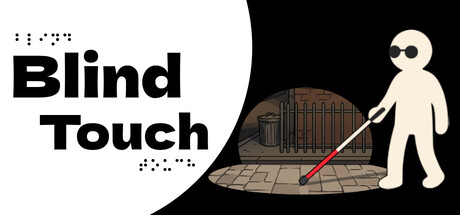
Blind Touch scores 77/100 — better than 87% of Walking Simulator capsules (n=1,308).

Quick text summary

Blind Touch scored 77/100 on Steam Analyzer — Good for a Walking Simulator capsule. Top priority fix: [composition] Shift the white figure slightly left to create safer margin from right edge and reduce crop vulnerability without losing focal prominence.

Capsule scores by dimension

  • Genre Clarity: 8/10 — Strong disability simulation messaging. The white cane-wielding figure against a dark interior immediately communicates a blindness or low-vision perspective game. The cane is the dominant visual anchor and the play-space with architectural detail reinforces exploration mechanics. At tiny size, the silhouette of the figure with cane remains clear enough to signal the core concept, though fine details of the environment blur.
  • Title Readability: 9/10 — Excellent bold sans-serif clarity. Large, high-contrast black sans-serif 'Blind Touch' sits on white background in upper left, reading clearly at all sizes including tiny thumbnails. The dotted braille elements above and below add thematic reinforcement without compromising legibility. At small and tiny sizes, the title remains the dominant readable element and does not collapse.
  • Contrast & Color: 8/10 — Strong value separation and silhouettes. The white figure and cream interior stand out sharply against the deep black negative space, creating clear silhouette separation that holds at tiny size. The warm brown architectural tones provide visual depth without muddying the primary subject. In grayscale, the contrast remains strong with distinct value steps between figure, environment, and background.
  • Uniqueness & Polish: 7/10 — Thematic and purposeful execution. The design commits fully to the blindness simulation concept with deliberate use of the white cane as the focal visual element and braille dots as decorative typography. The minimal color palette and clean vector style feel intentional rather than generic, though the interior environment is somewhat standard architectural illustration. The concept clearly differentiates from typical adventure or casual games, avoiding template-like presentation.
  • Brand Consistency: 7/10 — Cohesive thematic identity with potential. The capsule establishes a recognizable identity through the white figure, cane, and braille elements that would be memorable if sustained across marketing. The monochromatic palette and vector illustration style create internal coherence, and the visual metaphor (blindness exploration) is distinctive enough to become a signature. Without reference to the 8 screenshots, consistency feels solid but relies heavily on this single thematic anchor.
  • Composition: 7/10 — Clear focal point with balanced layers. The white figure with cane occupies the right-center zone as the primary subject, with the interior environment behind creating depth. The title is well-placed in the upper left away from the main action, and the braille dots frame the design without clutter. At tiny size, the composition reads as figure-first with supporting environment, though the right edge hugging creates minor crop vulnerability.

What works

  • Bold title legibility across all sizes. The high-contrast black sans-serif title remains instantly readable at full, small, and tiny sizes without any degradation or outline dependency.
  • Thematic visual metaphor. The white cane and braille elements directly communicate the game's core disability simulation concept and differentiate it from generic adventure titles.
  • Strong silhouette separation. The figure, interior space, and black background maintain distinct value ranges that preserve clarity even when viewed as a tiny thumbnail at quick-scroll speed.
  • Minimal color palette restraint. The use of monochromatic white, cream, and deep black feels intentional and premium rather than limited, avoiding muddiness across viewing sizes.

What hurts the capsule

  • Right-edge figure placement vulnerability. The white figure sits close to the right edge and may suffer slight cropping depending on Steam's specific crop zones for different view contexts.
  • Interior environment lacks distinctive detail. The background building interior, while supportive of the navigation theme, uses generic architectural lines that could apply to many games and adds limited uniqueness.
  • Braille dots lack visual weight at tiny size. While thematically relevant, the small dotted braille elements above and below the title become illegible noise at thumbnail sizes rather than reinforcing the message.

Priority fixes

  1. [composition] Shift the white figure slightly left to create safer margin from right edge and reduce crop vulnerability without losing focal prominence.
  2. [uniqueness_polish] Add subtle environmental detail or lighting that hints at a specific memorable location rather than generic interior space.
  3. [genre_clarity] Consider adding a faint accessibility icon or other visual cue that reinforces 'simulation' vs 'narrative adventure' at tiny size.

Store copy priority fixes

  1. [hook_strength] Fix the grammar error: "You Can't See! but your senses *draw* the world" to improve immediate credibility.
  2. [feature_communication] Add a concrete example of a puzzle or challenge: e.g., "Navigate a crowded subway platform by listening to footsteps and announcements, then use your cane to find the correct exit."
  3. [feature_communication] Clarify progression by adding one sentence about structure: e.g., "Recover lost memories across five distinct locations, each revealing chapters of your past."
  4. [uniqueness] Strengthen the opening short description with a clearer differentiator: e.g., "The only game where you navigate entirely through touch, sound, and memory—no visual cues." to emphasize what makes this stand apart.

Related guides

Steam app ID: 3521660 · Tags: Walking Simulator, Casual, Simulation, Indie, Emotional