Scoring genre clarity...

Paws Per Minute capsule

Paws Per Minute

A cozy desktop typing game where your furry friend hammers away on a keyboard as you type. Boost your WPM with colorful effects, and unlock speed achievements!

$0.991 user reviews
TypingCasualArcade
NobiusDec 18, 2025

Paws Per Minute scores 77/100 — better than 74% of Typing capsules (n=214).

1 user reviews · $0.99 · Released Dec 18, 2025 · By Nobius

Quick text summary

Paws Per Minute scored 77/100 on Steam Analyzer — Good for a Typing capsule. Top priority fix: [contrast_color] Consider subtly deepening the yellow background or adding a soft gradient to increase separation between title and background while maintaining warmth

Capsule scores by dimension

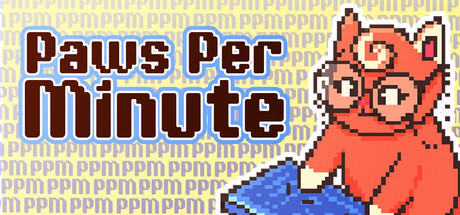
  • Genre Clarity: 8/10 — Clear casual typing game vibe. The red pixel-art character on a keyboard with visible typing action immediately signals a casual typing or idle game. The playful character design and cozy aesthetic align perfectly with the described genre. At TINY size, the keyboard and character silhouette remain readable and convey the core mechanic clearly.
  • Title Readability: 8/10 — Bold title with strong outline. The title 'Paws Per Minute' uses thick, dark-outlined blue and red letterforms that contrast sharply against the pale yellow background. At SMALL and TINY sizes, the outline holds legibility well and the text remains scannable during a quick scroll. The two-line layout with consistent sizing avoids awkward compression.
  • Contrast & Color: 8/10 — Strong value separation achieved. The dark red/brown title outline pops clearly against the pale yellow background, and the red character stands out from the muted yellow repeating text pattern. The blue keyboard element adds secondary contrast and visual interest. In grayscale and at tiny sizes, the dark edges of letters and character silhouette remain distinctly separated from the background.
  • Uniqueness & Polish: 7/10 — Charming pixel art with personality. The retro pixel-art style and concept of a furry typist creates a memorable hook distinct from generic typing game presentations. The character's expressive pose and the colorful keyboard suggest a well-crafted casual experience rather than a template. The execution feels intentional and cohesive, though the pixel aesthetic is familiar within indie games.
  • Brand Consistency: 7/10 — Consistent retro pixel identity. The capsule establishes a clear retro pixel-art brand identity with the charming red character and blocky aesthetic that should be recognizable across other store materials. The warm yellow-to-muted background palette and playful mascot design suggest internal cohesion. Without seeing all 6 screenshots, this appears to represent a consistent visual direction.
  • Composition: 8/10 — Well-balanced focal hierarchy. The red character on the right serves as a clear primary focal point, while the title on the left uses negative space effectively without cluttering the composition. The keyboard element beneath the character adds depth and reinforces the mechanic without overwhelming. At SMALL and TINY sizes, the character remains the clear hero and the title reads distinctly in its own zone.

What works

  • Mascot character instantly memorable. The red pixel-art character is charming, recognizable, and communicates playfulness that matches the cozy typing game concept.
  • Title contrast and legibility. Dark outlines on the blue and red letterforms ensure 'Paws Per Minute' remains readable at all sizes including TINY.
  • Genre intent communicated visually. Keyboard + character + typing action clearly signal a casual typing or idle game without ambiguity.
  • Background pattern supports theme. The subtle repeating text pattern in the background reinforces the typing game concept while remaining unobtrusive.

What hurts the capsule

  • Background pattern mild noise distraction. The dense repeating text pattern, while thematic, creates visual busy-ness that slightly competes with the main subject at full size.
  • Limited color palette variation. Reliance on red, blue, and yellow with pale background offers less dynamic visual interest compared to top-tier casual game capsules.

Priority fixes

  1. [contrast_color] Consider subtly deepening the yellow background or adding a soft gradient to increase separation between title and background while maintaining warmth
  2. [uniqueness_polish] Ensure the character animation or pose variation appears consistent across store materials to strengthen brand recall and premium polish perception

Store copy priority fixes

  1. [feature_communication] Add a second feature bullet describing the progression or reward system explicitly (e.g., 'Unlock Achievements & Cosmetics – Earn cat skins, sound effects, and visual themes by hitting WPM milestones and accuracy streaks').
  2. [hook_strength] Strengthen the short description by leading with the unique desktop overlay angle: 'A typing game that lives on your desktop—your adorable pixel-cat companion types alongside you, reacting to every keystroke and celebrating your speed improvements.'
  3. [feature_communication] Expand the 'Cute Visual Effects' bullet to explain one or two concrete examples of what the player sees (e.g., 'Cute Visual Effects – Watch the cat sprint, spin, and trigger screen flashes that intensify with your typing speed; unlock new color themes as you improve').
  4. [audience_targeting] Add a sentence clarifying who benefits most: 'Perfect for casual typists wanting daily motivation, students building finger dexterity, or anyone who wants a cheerful productivity companion.'

Related guides

Steam app ID: 4222650 · Tags: Typing, Casual, Arcade, 2D, Cute