Scoring genre clarity...
My Tiny Grocery Store - Desktop Idle Supermarket Game capsule

My Tiny Grocery Store - Desktop Idle Supermarket Game

My Tiny Grocery Store is an idle shopping simulator located in the bottom right corner of your screen that allows you to manage your store while also completing other tasks! Design your store, arrange your shelves, and enjoy earning money.

$4.99Mostly Positive(18)
SimulationIdlerAutomation
Musa GUNGORJan 19, 2026

My Tiny Grocery Store - Desktop Idle Supermarket Game scores 87/100 — better than 98% of Simulation capsules (n=5,188).

Mostly Positive (18 reviews) · $4.99 · Released Jan 19, 2026 · By Musa GUNGOR

Quick text summary

My Tiny Grocery Store - Desktop Idle Supermarket Game scored 87/100 on Steam Analyzer — Excellent for a Simulation capsule. Top priority fix: [brand_consistency] Verify that in-game UI, store customization colors, and promotional assets match the vibrant primary palette and rounded art style of this capsule to reinforce brand identity across touchpoints.

Capsule scores by dimension

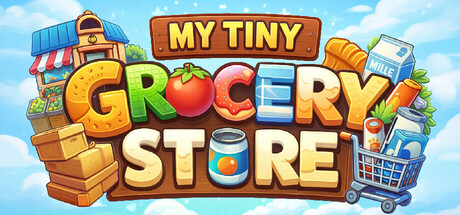
  • Genre Clarity: 9/10 — Crystal clear simulation management game. The capsule immediately communicates a shopping/grocery management game through iconic visual elements: colorful produce (apple, orange), shopping cart, cash register, stacked boxes, and store shelving. At tiny size, the shopping cart and merchandise arrangement remain distinctly readable and instantly signal a retail simulation. The casual, vibrant art style and whimsical presentation clearly differentiate it from complex strategy or action genres.
  • Title Readability: 9/10 — Bold, legible title at all sizes. The title 'MY TINY GROCERY STORE' uses large, chunky letterforms with strong chromatic variation—each letter is a different bright color (yellow, green, red, orange, blue, cream)—which maintains excellent legibility even at tiny size. The subtitle 'MY TINY' sits above in a clean rectangular banner with orange-brown framing. The staggered letter heights and vibrant color coding create natural visual hierarchy that survives squinting and small-scale viewing.
  • Contrast & Color: 9/10 — Vibrant palette with strong value separation. The bright blue sky background provides excellent value contrast against the warm, saturated colors of the store elements (reds, oranges, yellows, greens). The colorful produce and merchandise pop distinctly against the background, and the white/cream letterforms in the title maintain strong contrast throughout. Even in grayscale simulation, the bright mid-tones of the produce and the dark wood tones create clear silhouette separation that reads at all sizes including tiny.
  • Uniqueness & Polish: 8/10 — Charming art style with premium craft. The capsule demonstrates polished, intentional design with a distinctive cheerful aesthetic—rounded forms, bright saturated colors, and playful proportions that feel premium rather than templated. The visual storytelling is cohesive: store building, shopping, money-making mechanics are all communicated through a unified whimsical illustration style. The asset quality and care in rendering (cloud detail, shelf styling, product variety) signals a well-crafted indie game rather than generic template work.
  • Brand Consistency: 8/10 — Coherent visual identity with signature style. The capsule establishes a clear internal brand voice: vibrant primary colors, rounded cartoonish forms, warm-toned wooden elements, and playful scale distortion create a recognizable identity. The store aesthetic with colorful shelving, produce displays, and shopping infrastructure appears consistently styled. With access to 9 store screenshots, this 2D illustrated style should reinforce a memorable visual brand across marketing materials and in-game UI.
  • Composition: 9/10 — Excellent hierarchy with balanced focal point. The composition centers attention on the large 'GROCERY STORE' title with the storefront and cart elements anchoring the composition, while background store structure and shelving provide balanced supporting detail. The main title occupies safe central real estate with the 'MY TINY' banner above providing upper framing. At small and tiny sizes, the chunky letters and colorful store elements maintain distinct visual hierarchy without clutter or edge-hugging risks.

What works

  • Outstanding genre recognition. Shopping cart, produce, register, and shelves instantly communicate retail management simulation to the eye even at tiny thumbnail size.
  • Title legibility across all scales. Large chunky letters with individual color coding ensure the title remains readable and memorable at tiny, small, and full sizes.
  • Vibrant color strategy. The saturated primary colors provide excellent contrast against the dark Steam background and create visual energy that attracts attention during quick scroll.
  • Polished, cohesive art direction. Consistent rounded, cartoonish illustration style with intentional detail in clouds, shelving, and product arrangement signals premium indie craft.

What hurts the capsule

  • Minimal differentiation from competitors. While well-executed, the cheerful cartoon grocery store aesthetic shares visual DNA with similar casual simulators like Supermarket Simulator and Go-Go Town, potentially limiting brand distinctiveness.
  • Tagline subtitle may compete for attention. The 'MY TINY' banner, while readable, adds a secondary text element that slightly dilutes focus from the main title at full size.

Priority fixes

  1. [brand_consistency] Verify that in-game UI, store customization colors, and promotional assets match the vibrant primary palette and rounded art style of this capsule to reinforce brand identity across touchpoints.
  2. [uniqueness_polish] Consider adding a subtle unique visual signature—such as a character mascot or distinctive store icon—that could appear across multiple capsule variations to increase memorable brand recall versus competing grocery simulators.
  3. [composition] Test capsule appearance at actual Steam listing sizes (231×87 and 120×45) to confirm that the colorful letter styling remains distinctly readable without color banding or anti-alias artifacts on small displays.

Store copy priority fixes

  1. [feature_communication] Rewrite the Features section to explain *how* shelves, carpets, and customization enable player expression and progression. Example: 'Arrange 80+ unique shelves to create your dream store layout. Your design choices affect customer flow and earnings.'
  2. [hook_strength] Add 1–2 sentences after the opening explaining the progression or reward loop. Example: 'Watch your store grow as customers flock to well-designed shelves. Unlock new decorations and shelf types as you level up.' This adds emotional stakes.
  3. [feature_communication] Include a sentence explaining the core idle loop—what happens when the player is not actively engaging. Example: 'Earn passive income from your store even while idle. Return later to collect profits and expand.'
  4. [uniqueness] Add a sentence that articulates what makes the store management *different* beyond the window format, such as a unique store-building mechanic or progression system that other idle games lack.

Related guides

Steam app ID: 4275130 · Tags: Simulation, Idler, Automation, Strategy, Pixel Graphics