Scoring genre clarity...

Speed Grinder 2.0 capsule

Speed Grinder 2.0

A focused typing trainer that builds real speed through motion-based practice, teaching efficient key rollover and muscle memory through structured exercises and adaptive word patterns.

$4.99
Software TrainingUtilitiesSimulation
BladevampirekMar 24, 2026

Speed Grinder 2.0 scores 68/100 — better than 19% of Steam capsules we've analysed (n=22,374).

$4.99 · Released Mar 24, 2026 · By Bladevampirek

Quick text summary

Speed Grinder 2.0 scored 68/100 on Steam Analyzer — Solid for a Software Training capsule. Top priority fix: [uniqueness_polish] Introduce a visual element that hints at motion, speed, or adaptive learning—such as motion trails, a progress indicator, or layered key highlights—to differentiate from generic keyboard imagery.

Capsule scores by dimension

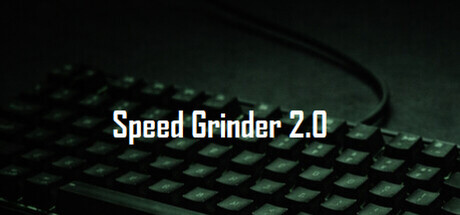
  • Genre Clarity: 7/10 — Typing trainer utility clearly signaled. The keyboard close-up with dramatic green backlighting immediately communicates a typing or keyboard-focused application. At TINY size, the keyboard silhouette remains recognizable and the green technical aesthetic suggests a software utility. However, the specific subgenre (typing trainer vs. mechanical keyboard shop vs. programming tool) requires the title to disambiguate, which it does adequately.
  • Title Readability: 8/10 — Title legible at all sizes. The white sans-serif text 'Speed Grinder 2.0' sits in the upper-left area with strong contrast against the dark background and keyboard. Letters remain distinct even at TINY size due to adequate font weight and spacing. The title placement avoids busy keyboard texture and sits in a controlled dark zone, supporting readability across all viewing conditions.
  • Contrast & Color: 8/10 — Strong value separation and pop. Bright white title text and glowing green keyboard backlighting create excellent value contrast against the near-black background. The green glow adds visual interest while maintaining clear silhouette separation. In grayscale, the white text and bright keyboard glow still stand out distinctly, ensuring readability during quick scrolls on the Steam dark background.
  • Uniqueness & Polish: 6/10 — Competent but visually generic. The lit keyboard aesthetic is functional and thematically appropriate for a typing trainer, but it is a common visual trope in keyboard and productivity software. The green glow effect and dramatic lighting are well-executed technically, but lack a distinctive hook or visual storytelling that communicates the 'speed' or 'grinder' motion-based practice angle. The capsule reads as a solid, professional utility cover rather than a premium or memorable product differentiation.
  • Brand Consistency: 5/10 — Limited internal identity cues. The design uses a generic keyboard with green backlighting and lacks distinctive brand markers, character, or signature visual language that would make 'Speed Grinder 2.0' recognizable across marketing materials. The version number is included but no iconic motif, color palette, or UI pattern emerges that signals a specific brand identity. Without access to the 7 store screenshots, this feels like a standalone capsule without strong internal cohesion signals to other brand touchpoints.
  • Composition: 7/10 — Clear focal point, safe margins. The keyboard occupies the center and lower two-thirds, creating a natural focal point, while the title sits safely in the upper-left with breathing room. At SMALL and TINY sizes, the keyboard silhouette remains the primary subject and the white title is clearly separated. The composition avoids edge-hugging and cluttered competing elements, though the keyboard texture could be considered slightly busy in the lower region.

What works

  • Strong title contrast and placement. White sans-serif text positioned in a controlled dark zone with excellent readability at all sizes, including TINY thumbnails.
  • Clear genre signal via keyboard imagery. The lit keyboard immediately communicates a typing or keyboard-focused software tool, reducing ambiguity about the application type.
  • Effective value separation for quick scroll. Bright whites and glowing greens pop distinctly against the dark background, ensuring the capsule captures attention during brief Steam browsing sessions.

What hurts the capsule

  • Generic keyboard aesthetic lacks differentiation. The lit keyboard is a common trope in typing software and mechanical keyboard marketing, offering no visual hook that distinguishes Speed Grinder 2.0 from competitors.
  • No visual communication of unique value proposition. The capsule does not hint at 'motion-based practice,' 'adaptive word patterns,' or 'speed-building,' missing an opportunity to visually telegraph core mechanics.
  • Weak brand identity markers. No iconic character, symbol, signature palette, or recognizable motif that would make this capsule memorable or link it to a cohesive brand across other materials.

Priority fixes

  1. [uniqueness_polish] Introduce a visual element that hints at motion, speed, or adaptive learning—such as motion trails, a progress indicator, or layered key highlights—to differentiate from generic keyboard imagery.
  2. [brand_consistency] Develop a signature color accent or icon (beyond green backlighting) that appears consistently across store screenshots and marketing materials to build internal brand cohesion.
  3. [genre_clarity] Add a subtle UI element or progress bar at the bottom edge to reinforce the 'trainer' aspect and hint at the structured, adaptive exercise system.

Store copy priority fixes

  1. [feature_communication] Add a brief section describing the interface layout, menu structure, or visual design so buyers can mentally picture using the software.
  2. [hook_strength] Reorder the detailed description to place the 'About the Game' section immediately after the short description, moving the weekend challenge to the bottom to maintain focus on core features.
  3. [feature_communication] Include a 'System Requirements' or 'Compatibility' subsection specifying supported platforms, keyboard types, and OS requirements explicitly.
  4. [uniqueness] Add a one-sentence comparison to the nearest competitor (e.g., 'Unlike Keybr or Monkeytype, Speed Grinder trains mechanical rollover patterns, not random words') to sharpen differentiation.

Related guides

Steam app ID: 4455850 · Tags: Software Training, Utilities, Simulation, Education, Typing